Getting Started with rekuiper
This document describes how to install rekuiper and create an edge stream processing pipeline. It uses the REST API, the kuiper CLI, and the web management dashboard.
1. Overview of the Scenario
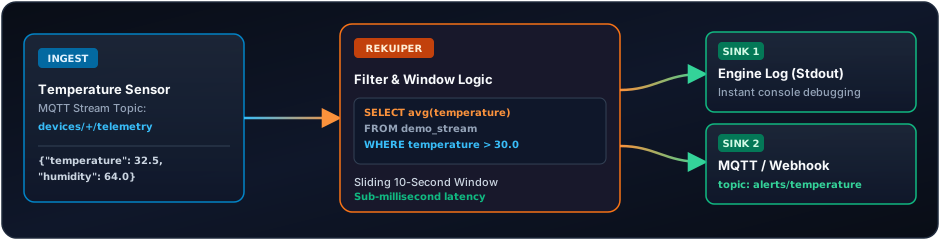
An industrial sensor transmits temperature and humidity readings each second. The pipeline completes these tasks:
- Ingest telemetry events continuously.
- Filter anomalous temperature events (for example,
temperature > 30.0°C). - Calculate a moving average across a sliding 10-second window.
- Transmit alerts to a local log or target MQTT broker without buffering or latency spikes.
2. Prerequisites and rekuiper Startup
Start rekuiper in Docker:
docker run -d \
  --name rekuiper \
  -p 9081:9081 \
  -p 20498:20498 \
  -p 20499:20499 \
  indusstack/rekuiper:1.0.0-rc4
Verify that the server operates:
curl http://localhost:9081/ping
# Response: pong
3. Method A: Management with the REST API
The HTTP REST API is the primary interface for automation scripts, CI/CD pipelines, and visual management tools.
Step 1: Create a Stream
Define a stream named sensor_stream. The stream receives data from the sensor/data MQTT topic or HTTP push:
curl -X POST http://localhost:9081/streams \
  -H "Content-Type: application/json" \
  -d '{
    "sql": "CREATE STREAM sensor_stream (temperature float, humidity bigint) WITH (DATASOURCE=\"sensor/data\", FORMAT=\"JSON\")"
  }'
Step 2: Create a Streaming Rule
Deploy a rule that calculates the average temperature across a 10-second tumbling window:
curl -X POST http://localhost:9081/rules \
  -H "Content-Type: application/json" \
  -d '{
    "id": "temp_monitor_rule",
    "sql": "SELECT avg(temperature) as avg_temp, max(temperature) as max_temp FROM sensor_stream GROUP BY TumblingWindow(ss, 10) HAVING avg_temp > 30.0",
    "actions": [
      {
        "log": {}
      }
    ]
  }'
Step 3: Inject Test Data
Send sample events to the stream:
curl -X POST http://localhost:9081/streams/sensor_stream/data \
  -H "Content-Type: application/json" \
  -d '{"temperature": 32.5, "humidity": 65}'

curl -X POST http://localhost:9081/streams/sensor_stream/data \
  -H "Content-Type: application/json" \
  -d '{"temperature": 35.0, "humidity": 68}'
Step 4: Monitor Rule Execution
Check the runtime execution metrics:
curl http://localhost:9081/rules/temp_monitor_rule/status4. Method B: Management with the kuiper CLI
rekuiper is compatible with the kuiper command-line tool.
Execute CLI commands directly inside the running container:
# Open an interactive shell inside the container
docker exec -it rekuiper /bin/sh

# List existing streams
bin/kuiper show streams

# Create a stream
bin/kuiper create stream cli_demo '(temperature float, humidity bigint) WITH (DATASOURCE="cli_demo", FORMAT="JSON")'

# Submit an ad-hoc query
bin/kuiper query
Submit a query inside the interactive prompt:
kuiper > SELECT * FROM cli_demo WHERE temperature > 30.0;
Query was submit successfully.
5. Method C: Management with the Interactive OpenAPI / Swagger UI
rekuiper embeds two visual management interfaces on HTTP port 9081:
- Interactive OpenAPI 3.0 / Swagger UI Explorer: Explore endpoints, inspect JSON schemas, validate rules, and execute live API calls.
- Embedded Web Management Console (
/ui): Monitor engine throughput, manage active rules, and inspect Dead-Letter Queue (DLQ) errors in real time.
5.1 The OpenAPI 3.0 / Swagger UI Explorer
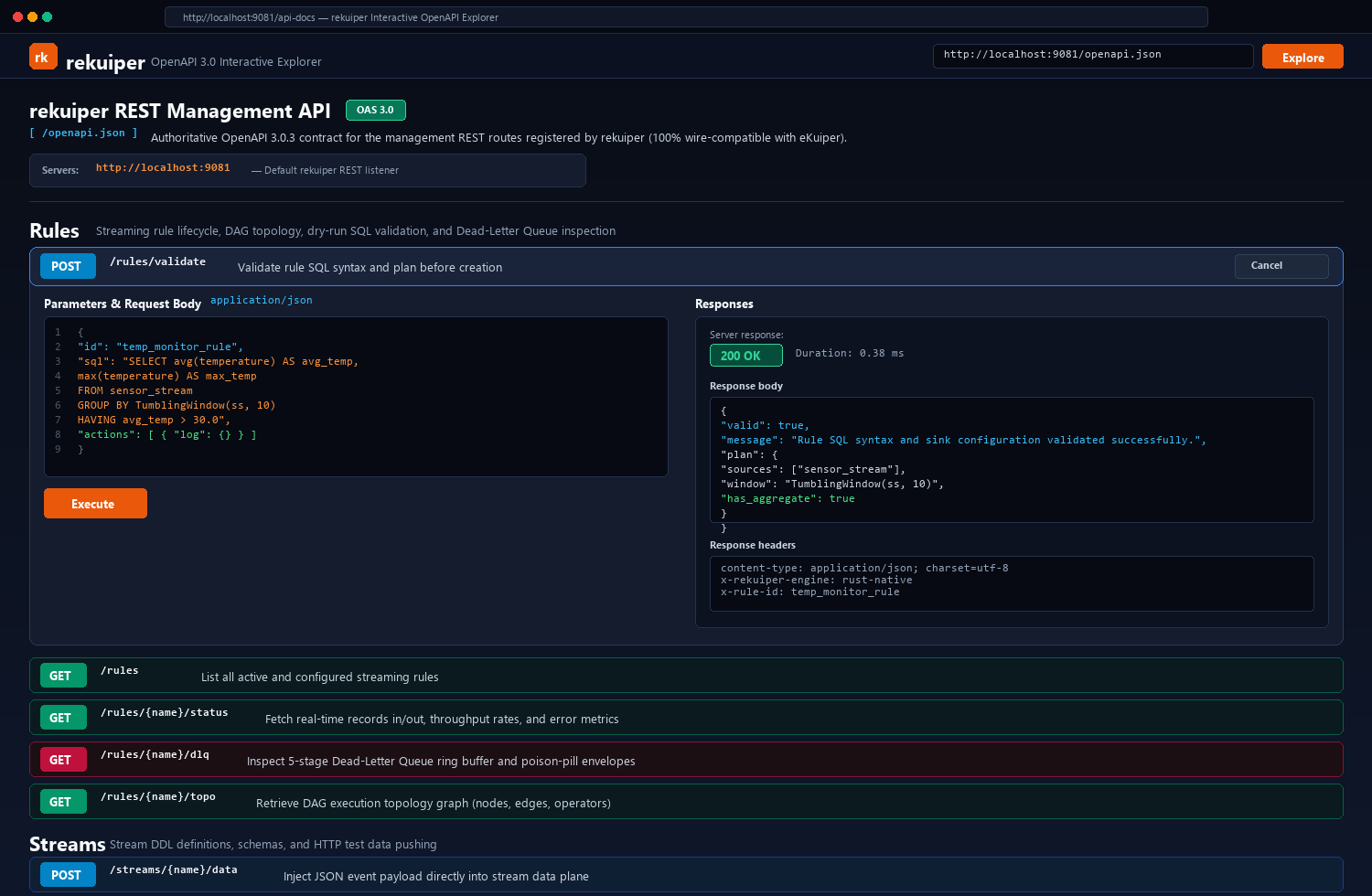
rekuiper serves an authoritative OpenAPI 3.0.3 specification at /openapi.json. It is 100% wire-compatible with the eKuiper REST contract. You can explore the API directly in any browser using the embedded Swagger UI or your favorite API client (such as Postman or Insomnia).
Key OpenAPI Endpoint Groups
| Category | Endpoint | Method | Description |
|---|---|---|---|
| Streams | /streams | GET, POST | List all defined streams or create a new stream definition. |
| Streams | /streams/{name} | GET, DELETE | Retrieve schema details or delete an existing stream. |
| Streams | /streams/{name}/data | POST | Push JSON telemetry directly into the stream data plane. |
| Rules | /rules | GET, POST | List all streaming rules or deploy a new pipeline. |
| Rules | /rules/validate | POST | Validate rule SQL syntax and plan before creation. |
| Rules | /rules/{name}/status | GET | Retrieve real-time counters, throughput rates, and error tallies. |
| Rules | /rules/{name}/topo | GET | Retrieve DAG execution topology graph (operators, sources, sinks). |
| Rules | /rules/{name}/dlq | GET, DELETE | Inspect or clear 5-stage Dead-Letter Queue poison-pill envelopes. |
| System | /ping | GET | Health check endpoint returning HTTP 200 pong. |
| System | / | GET | Host statistics, memory usage, CPU load, and engine uptime. |
| Metrics | /metrics | GET | Prometheus exposition format for external scraping. |
5.2 Step-by-Step OpenAPI Workflow
Follow these steps to explore and test the engine using the interactive OpenAPI interface:
Step 1: Open the OpenAPI Explorer
Open the interface in your browser:
http://localhost:9081/api-docsNote: If you use Swagger Editor or Postman, import the raw OpenAPI JSON specification directly from http://localhost:9081/openapi.json.
Step 2: Validate a Rule with Dry-Run Execution
You can validate SQL syntax and operator plans before you deploy a pipeline:
- Locate the Rules category.
- Click
POST /rules/validateto expand the endpoint card. - Click the Try it out button in the upper right corner.
- Paste your pipeline JSON definition into the Request body editor:json
{ "id": "temp_monitor_rule", "sql": "SELECT avg(temperature) AS avg_temp, max(temperature) AS max_temp FROM sensor_stream GROUP BY TumblingWindow(ss, 10) HAVING avg_temp > 30.0", "actions": [ { "log": {} } ] } - Click the blue Execute button.
- Verify the response. rekuiper returns HTTP
200 OKwith plan details in under 1 millisecond:json{ "valid": true, "message": "Rule SQL syntax and sink configuration validated successfully.", "plan": { "sources": ["sensor_stream"], "window": "TumblingWindow(ss, 10)", "has_aggregate": true } }
Step 3: Monitor Live Rule Metrics
- Expand the
GET /rules/{name}/statusendpoint. - Click Try it out.
- Enter
temp_monitor_rulein thenamefield. - Click Execute. The engine returns live processing statistics:
source_sensor_stream_0_records_in_totalsource_sensor_stream_0_records_out_totalop_window_0_records_in_totalsink_log_0_records_in_total
Step 4: Inspect the Execution Topology
- Expand the
GET /rules/{name}/topoendpoint. - Enter the rule name and click Execute.
- Inspect the directed acyclic graph (DAG) structure. It shows all operator dependencies from source to sink.
5.3 Embedded Web Management Console
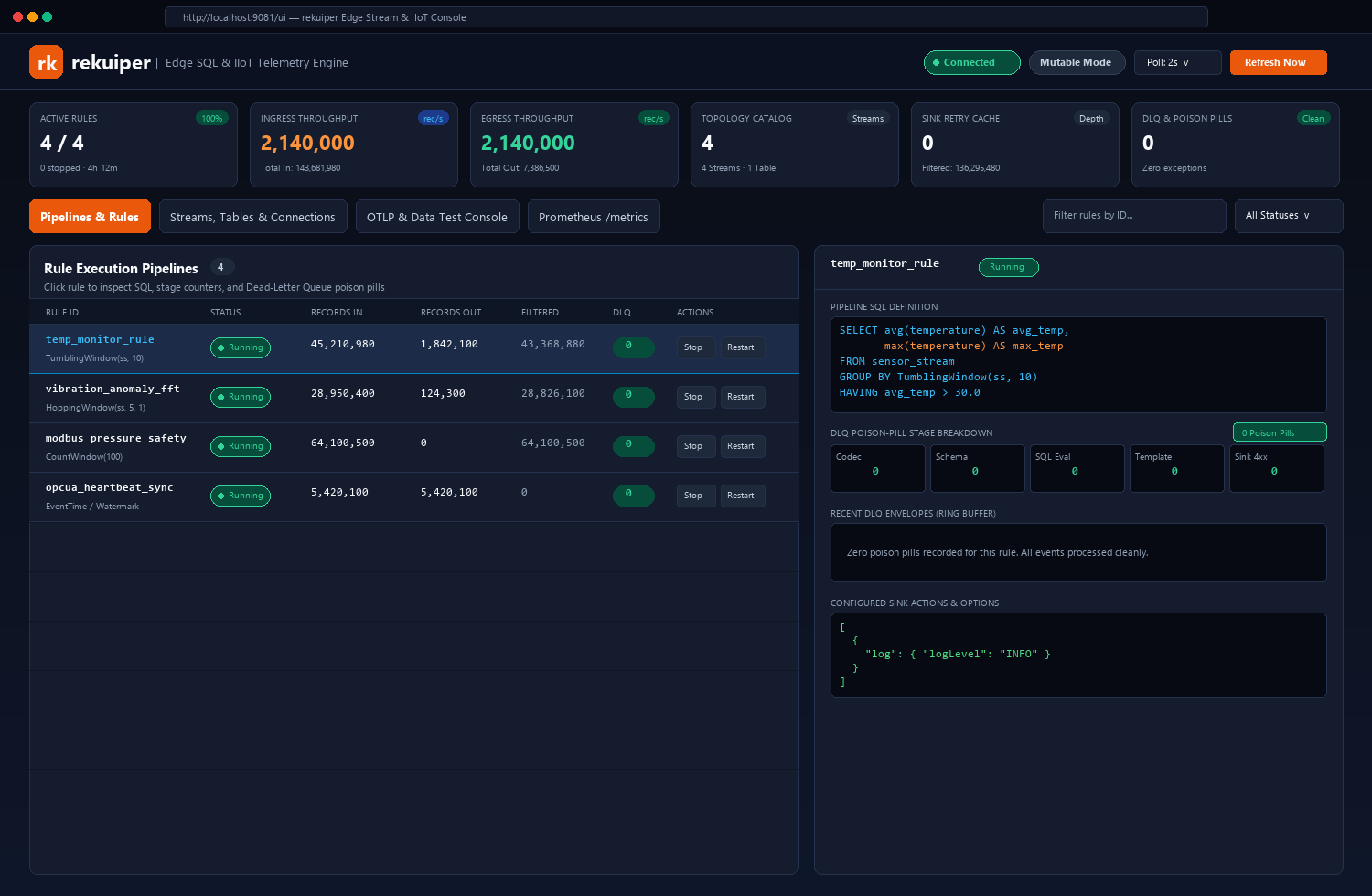
In addition to the OpenAPI Explorer, rekuiper includes a zero-dependency HTML5 Web Management Console at http://localhost:9081/ui.
Web Console Capabilities
Fleet KPI Strip:
- Active Rules: Percentage and count of running vs stopped pipelines.
- Ingress / Egress Throughput: Real-time processed records per second (1,000,000+ events/s per core).
- Topology Catalog: Total declared streams and lookup tables.
- Sink Retry Cache: Memory-buffered egress events awaiting transport reconnection.
- DLQ Poison Pills: Count of rejected records across all active rules.
Rule Execution Pipelines Table:
- Inspect status badges (
Running,Stopped,Halted). - Monitor cumulative records in, records out, and filtered counts.
- Execute lifecycle commands (
Stop,Restart,Reset State) with a single click.
- Inspect status badges (
Slide-Over Rule Inspector:
- Click any rule in the table to open its slide-over drawer.
- Review the complete pipeline SQL definition and configured sink actions.
- Inspect the 5-Stage DLQ Breakdown (
Codec,Schema,SqlEval,DataTemplate,SinkDelivery). - Inspect poison-pill envelopes to diagnose malformed payloads without restarting the engine.
OTLP & Data Plane Test Console:
- Navigate to the OTLP & Data Test Console tab.
- Inject simulated payloads into
/v1/metrics,/v1/logs, or HTTP streams directly from your browser. - Test end-to-end edge streaming without starting external MQTT brokers.
6. Next Steps
- Read the SQL Reference and Built-in Functions.
- Configure Persistent Connections.
- Read Production Deployment and Configuration.
- Connect to AI Agents through MCP.