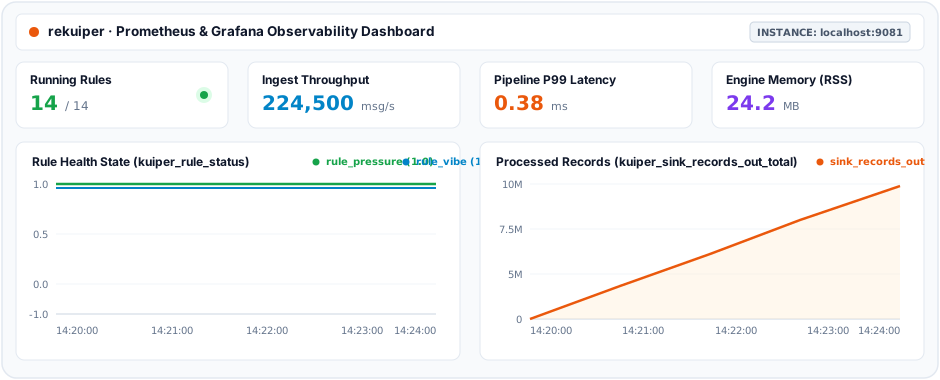
Monitor Rule Status with Prometheus
rekuiper integrates natively with Prometheus to export streaming metrics, operator latencies, and rule health states.
Prometheus Metrics
rekuiper exposes 32 Prometheus metric families providing comprehensive observability across rules, sources, operators, sinks, and connections:
Rule & Global Metrics
kuiper_rule_status: Operational status of each rule (1= running,0= stopped/paused,-1= failed).kuiper_rule_count: Total active and paused rules partitioned bystatus="running"|"stopped".kuiper_conn_status_gauge: External connection status partitioned by connectionname.
Source Metrics
kuiper_source_records_in_total: Total input records received at sources (rule,op,op_instance,type).kuiper_source_records_out_total: Total output records emitted by sources.kuiper_source_messages_processed_total: Total messages processed by sources.kuiper_source_exceptions_total: Total exceptions encountered by sources.kuiper_source_buffer_length: Current message buffer length for sources.kuiper_source_connection_status: Source connection state (1= connected,0= connecting,-1= disconnected).kuiper_source_process_latency_us: Source processing latency in microseconds.kuiper_source_process_latency_us_hist_bucket,_hist_count,_hist_sum: Source processing latency histogram buckets and aggregates.
Operator Metrics
kuiper_op_records_in_total: Total input records received by pipeline operators (rule,op,op_instance,type).kuiper_op_records_out_total: Total output records emitted by pipeline operators.kuiper_op_messages_processed_total: Total messages processed by operators.kuiper_op_exceptions_total: Total exceptions encountered by operators.kuiper_op_buffer_length: Current input buffer queue depth for operators.kuiper_op_process_latency_us: Operator processing latency in microseconds.kuiper_op_process_latency_us_hist_bucket,_hist_count,_hist_sum: Operator processing latency histogram buckets and aggregates.
Sink Metrics
kuiper_sink_records_in_total: Total records received by sinks (rule,op,op_instance,type).kuiper_sink_records_out_total: Total records successfully transmitted by sinks.kuiper_sink_messages_processed_total: Total messages handled by sinks.kuiper_sink_exceptions_total: Total sink errors and transmission exceptions.kuiper_sink_buffer_length: Current message buffer queue depth for sinks.kuiper_sink_connection_status: Target sink connection state (1= connected,0= connecting,-1= disconnected).kuiper_sink_process_latency_us: Sink transmission latency in microseconds.kuiper_sink_process_latency_us_hist_bucket,_hist_count,_hist_sum: Sink processing latency histogram buckets and aggregates.
NOTE
Compatibility & Cloud-Native Scraping Note: Single-Port Metrics In legacy eKuiper, Prometheus metrics are served strictly on a dedicated port (default 20499) and return 404 Not Found on the standard REST API port (9081). rekuiper serves Prometheus metrics directly on the REST port (http://<host>:9081/metrics) as well as the configurable dedicated metrics port.
Why we chose this difference: In Kubernetes and containerized microservice deployments, scraping metrics directly from the primary pod service port simplifies deployment manifests, reduces firewall port surface, and eliminates multi-port ingress configuration friction.
Rule Status Metrics
You can inspect real-time metrics for a rule through the CLI, management console, or REST API:
GET http://127.0.0.1:9081/rules/rule1/statusResponse sample:
{
  "status": "running",
  "lastStartTimestamp": "1712126817659",
  "lastStopTimestamp": "0",
  "nextStopTimestamp": "0",
  "source_demo_0_records_in_total": 265,
  "source_demo_0_records_out_total": 265,
  "source_demo_0_process_latency_us": 0,
  "source_demo_0_buffer_length": 0,
  "source_demo_0_last_invocation": "2022-08-22T17:19:10.979128",
  "source_demo_0_exceptions_total": 0,
  "source_demo_0_last_exception": "",
  "source_demo_0_last_exception_time": 0,
  "op_2_project_0_records_in_total": 265,
  "op_2_project_0_records_out_total": 265,
  "op_2_project_0_process_latency_us": 0,
  "op_2_project_0_buffer_length": 0,
  "op_2_project_0_last_invocation": "2022-08-22T17:19:10.979128",
  "op_2_project_0_exceptions_total": 0,
  "op_2_project_0_last_exception": "",
  "op_2_project_0_last_exception_time": 0,
  "sink_mqtt_0_0_records_in_total": 265,
  "sink_mqtt_0_0_records_out_total": 265,
  "sink_mqtt_0_0_process_latency_us": 0,
  "sink_mqtt_0_0_buffer_length": 0,
  "sink_mqtt_0_0_last_invocation": "2022-08-22T17:19:10.979128",
  "sink_mqtt_0_0_exceptions_total": 0,
  "sink_mqtt_0_0_last_exception": "",
  "sink_mqtt_0_0_last_exception_time": 0
}
Operator Metric Definitions
Every pipeline operator (sources, operators, and sinks) exports the following counters and gauges:
records_in_total: Total input records received since rule initialization.records_out_total: Total output records emitted downstream after processing.process_latency_us: Execution latency of the most recent event batch in microseconds.buffer_length: Current message count waiting in the operator input buffer queue.last_invocation: Timestamp of the most recent operator execution.exceptions_total: Total recoverable errors encountered without stopping execution.last_exception: Diagnostic error message of the most recent exception.last_exception_time: Timestamp of the most recent exception.
Connection Metric Definitions
Sources and sinks export external connection lifecycle states:
connection_status: Current connection state (1= connected,0= connecting,-1= disconnected).connection_last_connected_time: Unix timestamp of the last successful connection.connection_last_disconnected_time: Unix timestamp of the last disconnection event.connection_last_disconnected_message: Error message recorded during the last disconnection.connection_last_try_time: Unix timestamp of the last reconnection attempt.
Configure the Prometheus Exporter in rekuiper
Enable the Prometheus endpoint in etc/kuiper.yaml:
basic:
  prometheus: true
  prometheusPort: 20499
When running in Docker, enable metrics using environment variables:
docker run -d \
  --name rekuiper \
  -p 9081:9081 \
  -p 20499:20499 \
  -e KUIPER__BASIC__PROMETHEUS=true \
  indusstack/rekuiper:1.0.0-rc4
The server exposes raw Prometheus metrics on http://localhost:20499/metrics.
Scrape Metrics Using Prometheus
Download and install Prometheus from the Prometheus Download Page.
Add rekuiper to scrape_configs in prometheus.yml:
global:
  scrape_interval: 15s
  evaluation_interval: 15s

scrape_configs:
  - job_name: 'ekuiper'
    static_configs:
      - targets: ['localhost:20499']
Start the Prometheus service:
./prometheus --config.file=prometheus.ymlOpen http://localhost:9090 in your browser to inspect raw counters, verify scrape targets under Status > Targets, and query real-time rule telemetry expressions.
Visualize Metrics with Grafana
rekuiper metrics integrate seamlessly into Grafana for real-time operational monitoring and alerting.
- Add Data Source: In Grafana, navigate to Connections > Data Sources > Prometheus, set the URL to
http://<rekuiper-host>:9081/metrics(or dedicated port20499), and click Save & Test. - Import Dashboard: Navigate to Dashboards > New > Import.
- Upload Template: Upload the rekuiper Grafana dashboard JSON template from the release bundle or paste the template contents and click Import.
- Monitor Rule Telemetry: View real-time rule health states (
kuiper_rule_status), throughput rates (kuiper_sink_records_out_total), execution latencies, and buffer queue depths.