Installation and Deployment
rekuiper operates on diverse edge architectures. Supported platforms include single-board computers (Raspberry Pi, BeagleBone), industrial PCs, and edge servers.
1. Network Ports Reference
rekuiper uses these standard network ports:
| Port | Protocol | Service / Purpose | Default Accessibility |
|---|---|---|---|
9081 | HTTP / TCP | REST API, SSE event streaming, and eKuiper Manager UI backend | External (Host & LAN) |
20498 | TCP | NanoIPC / Edge IPC socket for high-speed local connector streaming | Internal / IPC |
20499 | TCP | Management RPC daemon for the kuiper CLI | Host / Internal |
2. Run with Docker
Docker provides a consistent deployment method for edge gateways.
Quick Run
Start the container:
docker run -d \
  --name rekuiper \
  -p 9081:9081 \
  -p 20498:20498 \
  -p 20499:20499 \
  indusstack/rekuiper:1.0.0-rc4
Production Deployment with Persistent Storage
For production environments, mount host directories for stream schemas, rule definitions, and state databases:
docker run -d \
  --name rekuiper \
  --restart unless-stopped \
  -p 9081:9081 \
  -p 20498:20498 \
  -p 20499:20499 \
  -v /var/lib/rekuiper/data:/kuiper/data \
  -v /var/lib/rekuiper/etc:/kuiper/etc \
  -v /var/log/rekuiper:/kuiper/log \
  -e KUIPER__BASIC__PROMETHEUS="true" \
  -e LOG_LEVEL="info" \
  indusstack/rekuiper:1.0.0-rc4
Verify service availability:
curl http://localhost:9081/ping
# Response: pong
3. Production Deployment with Docker Compose
Deploy rekuiper and an MQTT broker (Eclipse Mosquitto) with Docker Compose.
Create a docker-compose.yml file:
version: '3.8'

services:
  rekuiper:
    image: indusstack/rekuiper:1.0.0-rc4
    container_name: rekuiper
    restart: unless-stopped
    ports:
      - "9081:9081"
      - "20498:20498"
      - "20499:20499"
    environment:
      KUIPER__BASIC__REST_PORT: "9081"
      KUIPER__BASIC__PROMETHEUS: "true"
      MQTT_SOURCE__DEFAULT__SERVER: "tcp://mosquitto:1883"
      RUST_LOG: "info"
    volumes:
      - rekuiper-data:/kuiper/data
      - rekuiper-etc:/kuiper/etc
    depends_on:
      - mosquitto
    networks:
      - edge-net

  mosquitto:
    image: eclipse-mosquitto:2
    container_name: mosquitto
    restart: unless-stopped
    ports:
      - "1883:1883"
    networks:
      - edge-net

volumes:
  rekuiper-data:
  rekuiper-etc:

networks:
  edge-net:
    driver: bridge
Start the containers:
docker compose up -dService endpoints:
- rekuiper REST API:
http://localhost:9081 - Embedded Web Console:
http://localhost:9081/ui - Prometheus Metrics:
http://localhost:20499/metrics(orhttp://localhost:9081/metrics) - MQTT Broker:
localhost:1883
4. Standalone Binary Installation
On bare-metal Linux gateways, OpenWrt devices, or systems without container runtimes, rekuiper can run as a single native binary.
Download Prebuilt Binaries
Prebuilt binaries are available on GitHub Releases:
# Example for Linux x86_64 (replace with desired release tag)
curl -LO https://github.com/Indus-Stack/rekuiper/releases/download/v1.0.0-rc4/rekuiperd-x86_64-unknown-linux-musl.tar.gz
tar -xzf rekuiperd-x86_64-unknown-linux-musl.tar.gz
cd rekuiper

# Start the daemon
./bin/kuiperd
Compile from Source
To compile rekuiper with specific CPU architecture optimizations:
Prerequisites: Rust 1.80 or later, and Cargo.
# Clone the repository
git clone https://github.com/Indus-Stack/rekuiper.git
cd rekuiper

# Compile in release mode
cargo build --release

# The compiled binaries will be located at:
# target/release/kuiperd  (Server engine)
# target/release/kuiper   (CLI tool)
# target/release/rekuiper-mcp (MCP AI server)
Start the compiled daemon:
./target/release/kuiperd --etc etc --data data --log log5. Configuration Reference
rekuiper reads configuration from etc/kuiper.yaml. The engine supports environment variable overrides that use a double-underscore (__) delimiter:
| Environment Variable | Config Equivalent | Default | Description |
|---|---|---|---|
KUIPER__BASIC__REST_PORT | basic.restPort | 9081 | Port for the HTTP REST API |
KUIPER__BASIC__CLI_PORT | basic.cliPort | 20499 | Port for the internal CLI management RPC |
KUIPER__BASIC__PROMETHEUS | basic.prometheus | false | Enable Prometheus metrics at /metrics |
KUIPER__BASIC__CONSOLELOG | basic.consoleLog | true | Log events directly to stdout / console |
LOG_LEVEL | - | info | Logging verbosity (debug, info, warn, error) |
MQTT_SOURCE__DEFAULT__SERVERS | mqtt.default.servers | [tcp://127.0.0.1:1883] | Default MQTT broker address list |
6. Systemd Service Setup (Linux)
To run rekuiper as a background system service on Linux gateways:
Create /etc/systemd/system/rekuiper.service:
[Unit]
Description=rekuiper Stream Processing Engine
After=network.target

[Service]
Type=simple
User=rekuiper
ExecStart=/opt/rekuiper/bin/kuiperd --etc /opt/rekuiper/etc --data /opt/rekuiper/data --log /opt/rekuiper/log
Restart=always
RestartSec=5s
LimitNOFILE=65536

[Install]
WantedBy=multi-user.target
Enable and start the service:
sudo systemctl daemon-reload
sudo systemctl enable --now rekuiper
sudo systemctl status rekuiper
7. Kubernetes Deployment via Helm
Deploy rekuiper on Kubernetes or edge distributions (K3s, MicroK8s) using the official Helm chart:
# Clone the repository
git clone https://github.com/Indus-Stack/rekuiper.git
cd rekuiper

# Install the Helm chart
helm install rekuiper deploy/chart/rekuiper
Custom Configurations
Configure custom settings such as persistent volume claims:
helm install rekuiper deploy/chart/rekuiper \
  --set persistence.enabled=true \
  --set persistence.size=1Gi
For the complete values schema, review the rekuiper Helm Chart Documentation.
8. Cargo (crates.io) Installation
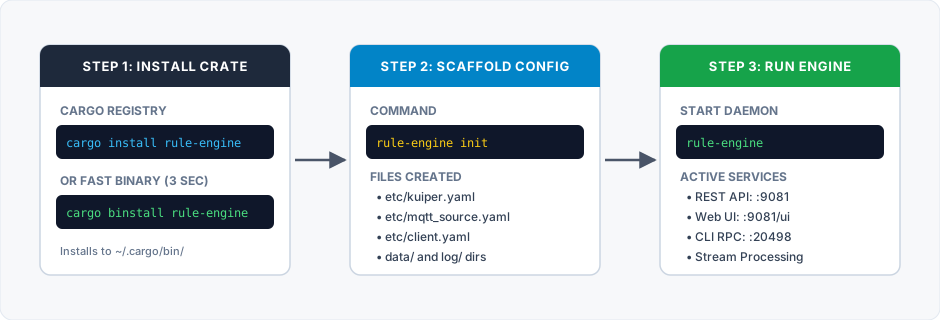
You can install rekuiper as a Rust crate using Cargo. The official package name on crates.io is rule-engine.
8.1 Install the Package
Install from source using cargo:
cargo install rule-engineOr install pre-compiled binaries directly using cargo-binstall:
cargo binstall rule-engineThis command installs three binary aliases in ~/.cargo/bin/:
rule-engine(primary command)kuiperd(100% drop-in command for LF Edge eKuiper)rekuiperd
8.2 Scaffold Configuration Files
cargo install copies only executable files. It does not copy default configuration directories.
Run the init command to create the default configuration files:
rule-engine initExpected output:
Scaffolding configuration in 'etc/':
  [CREATED] etc/kuiper.yaml
  [CREATED] etc/mqtt_source.yaml
  [CREATED] etc/client.yaml
  [CREATED] ./data/
  [CREATED] ./log/

Configuration complete! You can now start the daemon:
  rule-engine
To write configuration to a custom directory:
rule-engine init --dir /opt/rekuiper/etcTo overwrite existing files, add the --force flag:
rule-engine init --force8.3 Start the Engine
Start the daemon:
rule-engineVerify service status:
curl http://localhost:9081/ping
# Response: pong